Thank you for your continued attention and support for DOBOT. We are pleased to inform you that in March and April 2024, we launched a series of exciting new products, further enriching our product line. We believe these new products will bring more opportunities and competitive advantages to your business.
Product Focus
01 New Product: DOBOT X-Trainer AI Robot Operating Platform
Product Overview
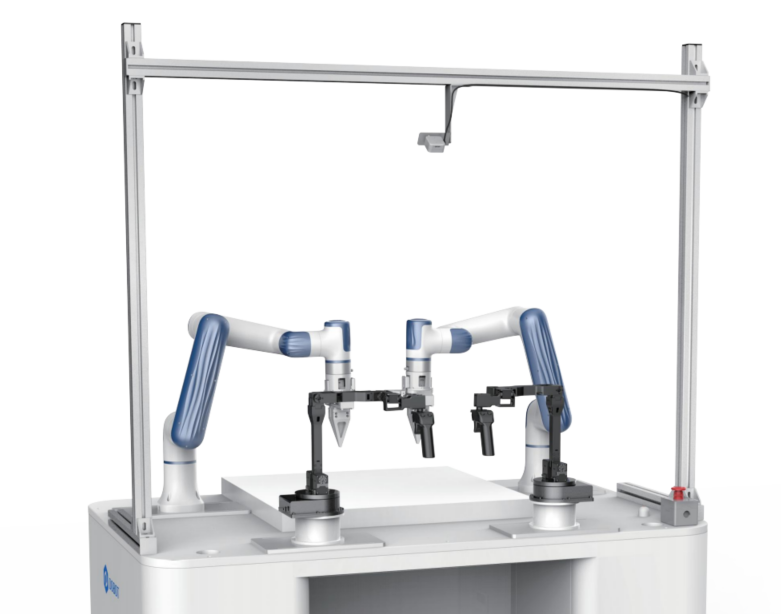
DOBOT X-Trainer, an AI robot operating platform for bimanual teleoperation, innovatively integrates imitation learning neural networks, industrial-grade robot arms, and high-performance master hands. It offers unprecedented flexibility and precision for Embodied AI training in teleoperation, reducing scene training time by 70%. This platform efficiently aids researchers and university students in AI data collection and AGI simulation research and practical tasks.
Product Highlights
- Rapid Training, Resilient to Interference: Regular scene training (e.g., dishwashing, folding clothes) can be completed in just 2 hours. When autonomously performing tasks, it can quickly correct real-time interference, enabling a significant increase in robot AI levels.
- Unprecedented Industrial Performance: Equipped with DOBOT Nova 2, with a repeat positioning accuracy of up to 0.05mm, making it the first AI training robot with industrial-grade data collection and action precision. It features a 25Hz end-to-end high-performance motion interface, with a response speed 150% faster than similar products, ensuring swift and efficient operation.
- Quick Buttons, Efficient Control: The master-hand unlock button allows quick locking and unlocking of the master hand posture, significantly reducing operator hand-fatigue. The record button controls the start or end of recording, ensuring more precise node control for data collection.
- Powerful Servo, Seamless Teleoperation: Adopting high-performance servo motor and a lightweight design, the hand load during operation is less than 500g, greatly reducing long-term operation fatigue. The master hand is ergonomically designed and configured in the same way as the slave hand, allowing for more flexible and easy execution of various complex and delicate tasks.
- Convenient Training, Future Exploration: Adopting teleoperation input methods, equipped with a data training platform and open API interface, it supports exporting data in specialized format for direct use by Embodied AI neural network models, facilitating the efficient development of research projects.
02 New Product: DOBOT Cobot Teach Pendant TP10
Product Overview
The Teach Pendant features a lightweight design, adapted to the CRA series collaborative robots, integrating aesthetics and ergonomics for a more comfortable hold. The physical buttons and large screen design make operation intuitive and simple, supporting hot-swapping to ensure both safety and flexibility, providing an excellent user experience.
.png)
Product Highlights
- Three-position enable switch ensures the safety of effective robot operation.
- 12 physical jog buttons create a control terminal with intuitive operation, efficient point alignment, and comfortable debugging.
- 10.1-inch ultra-clear capacitive screen with high-performance chip, provides a smooth and fluent operating experience.
- Safe and reliable: Complies with ISO 10218-1:2011; ISO 13849-1:2015; IP54 certification.
Official Links
03 New Product: DOBOT ES01 Electric Suction Cup
Product Overview
DOBOT ES01 is a small electric vacuum suction cup specifically developed for the Magician E6 six-axis collaborative robot. It supports plug-and-play for quickly implementing automated gripping solutions in teaching and research fields.
.png)
Product Highlights
- Easy to Deploy: Integrated design, compatible with Magician E6’s aviation socket, plug-and-play to eliminate complex wiring.
- Easy to Use: Controlled directly via the DobotStudio Pro, offering simple Blockly programming and efficient Script (Lua) programming. DOBOT also provides ES01 electric suction cup plugin for plug-and-play:
- Control the opening and closing of the suction cup, and get the current status of the suction cup.
- E6 end shortcut key can be configured to control the opening and closing of the suction cup.
- Equipped with script commands and block modules for easy customer programming.
- Compact Design: Tiny size, no external air source needed, low running noise, meeting teaching needs effortlessly.
- Flexible Expansion: The suction nozzle supports quick assembly and disassembly, capable of connecting to multiple nozzles for more application scenarios.
Official Links
04 Controller Software Update: V3.5.8.0
Applicable Products
CR series, Nova series
NOTE
This version corresponds to DobotStudio Pro 2.8.0 (PC) and CRStudio 4.13.0 (Android).
Key Updates
- Added “Vibration suppression” function for Nova, including vibration testing at the factory, significantly reducing on-site robot vibration.
- Improved ForceControl plugin with parameter range limits on the control software, and solved the known bugs.
05 Controller Software Update: V4.5.1.1
Applicable Products
CRA series, Magician E6
NOTE
- This version corresponds to DobotStudio Pro 4.5.x. Using other versions will be prompted as incompatible.
- The return value format for relative point offset commands RelPointUser and RelPointTool has been changed, please note the compatibility.
- The return value for bus register read commands GetInputBool and GetOutputBool has been changed, please note the compatibility.
Key Updates
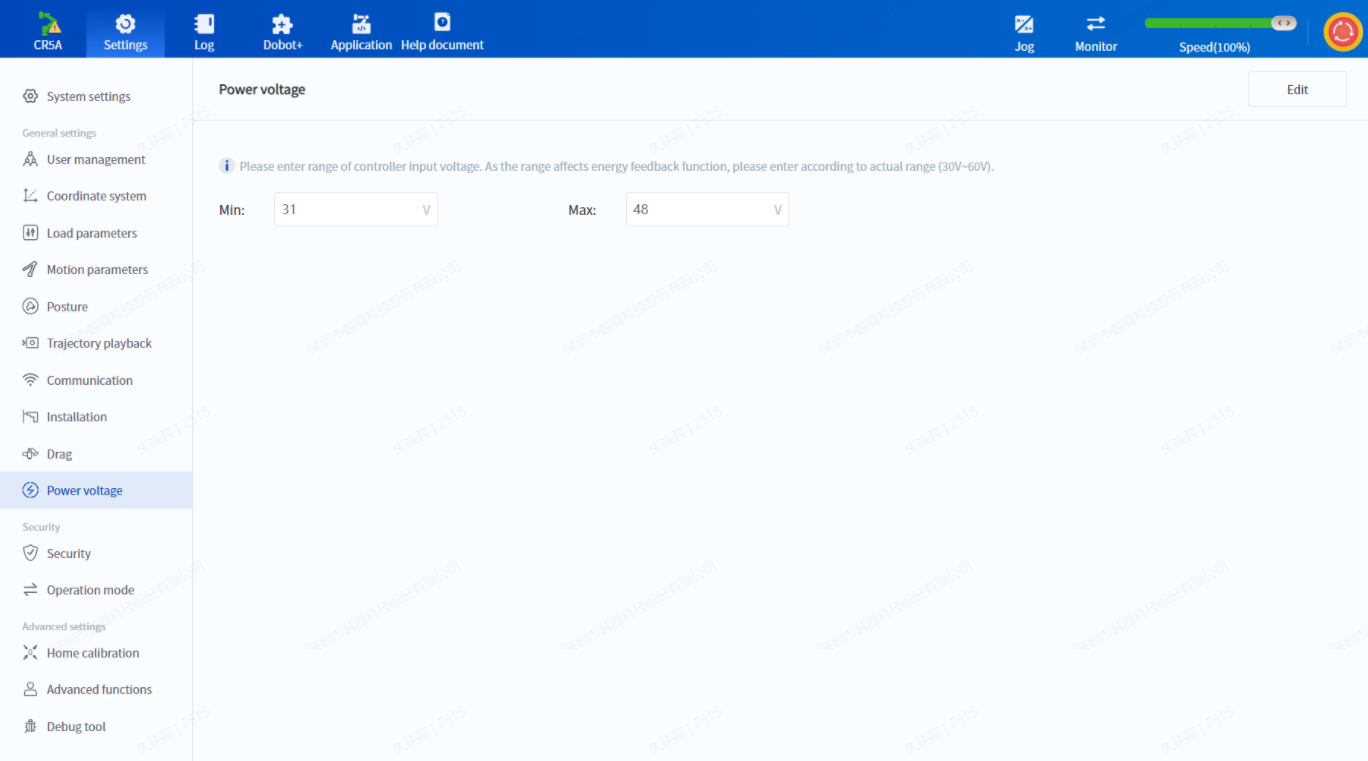
- Added a voltage setting interface for CC262 DC input controller. For composite robot application scenarios, set the appropriate voltage range in advance.
- DobotStudio Pro now has Traditional Chinese as the display language to meet the localization needs of the Taiwan market.
- Optimized robot logs to increase readability.
- Optimized the keyboard input method on mobile devices to solve the usability issue caused by system keyboard obstruction.
06 Plugin Version Update: Palletizing Process Package V2.1.0
Supporting Version
- Control software: DobotStudio Pro 4.5.1.x and above
- Controller: 4.5.2.0-pal
Key Updates
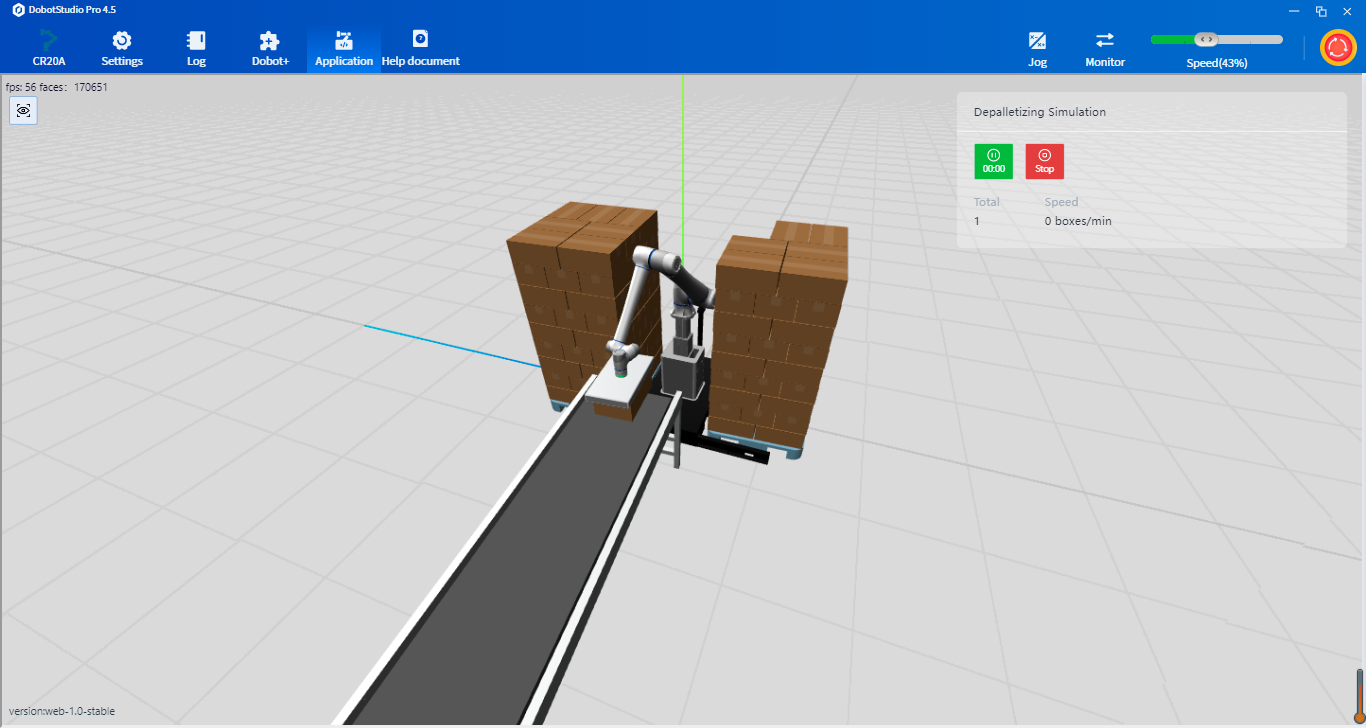
- Added palletizing simulation function: Users can now simulate palletizing based on the configured project to confirm the palletizing effect.
- Added depalletizing function: Users can now configure depalletizing projects to enable depalletizing operations.
- Added dual-conveyor function: Supports one palletizing workstation with two conveyors (production lines), allowing for alternating palletizing.
- Added automatic pattern function: Users can directly use or edit system-recommended pallet patterns, significantly improving configuration efficiency.
- Optimized pattern-editing function: Added copy-paste for pallet patterns and automatic alignment of boxes, improving pattern-editing efficiency.
- Optimized reachability detection function: System now prompts the specific position of unreachable boxes, aiding users in locating the problem.
New Product Preview
Welding Process Package V2.1.x, expected release: May 2024
Newly Compatible Welders:
| Welder Brand |
Communication Mode |
Typical Welder Model |
| Lincoln (powerwave) |
DeviceNet |
powerwave S series |
| GYS |
Modbus |
NEOPULSE series |
| Lorch |
Modbus |
P series; S series |
| Flama |
DeviceNet |
MIG-350RP/500RP |
| Kemppi |
Modbus |
AX mig; X5 power source series |
| OTC (daihen) |
DeviceNet |
welbee series |
| Megmeet |
DeviceNet |
Artsen series, Dex series, etc. |
If the robot uses analog communication with the welder, communication adaptation is not required and it can be used directly.
New Functions:
- Laser positioning: Use the laser sensor to scan the workpiece for initial position deviation, locating the real weld seam to reduce the impact of errors such as workpiece consistency and fixtures.
- Laser tracking: For long straight workpieces, thermal deformation during the welding process leads to weld-seam deviation, this function can be used to track the real weld seam in real time during the welding process.
- Touch positioning: Use welding wire to touch the workpiece to find the initial position, thus locating the real weld seam to reduce the impact of errors such as workpiece consistency and fixtures.
- Multipass welding: For thick-plate welding, Multipass welding is performed to increase the welding width by welding the same part multiple times. This function uses robots to reduce the teaching workload for multipass welding.
- Arc retry: Automatically retries welding if the arc does not start properly at the beginning.
- Arc restart: In case of arc stop during welding, this function enables the program to resume welding at the interrupted point when restarted.

 Metal Processing
 Automotive
 Food & Beverage
 Chemical
 Consumer Electronics
 Healthcare
 New Retail
 Semiconductor
 Welding
 Palletizing
 Loading and Unloading
 Assembly
 Bin Picking
.svg) Gluing
Gluing
 Insertion
 Polishing