[Software/Firmware Release Note] Six-axis Controller / DobotStudio Pro-4.5.1.X-20240529
DobotStudio Pro-4.5.1.2-20240529
I. Update Scope
This update is applicable to CRA series and Magician E6, and the released versions are as follows:
- DobotStudio Pro (PC): 4.5.1.2
II. Bug Fixes
Fixed the following issues:
- Incompatibility between the project point files in PC and the project point files in Teach Pendant.
- Anomaly in the drop-down menu interface when opening old versions of Dobot+ project blocks.
Six-axis Controller / DobotStudio Pro-4.5.1.1-20240517
I. Update Scope
This update is applicable to CRA series and Magician E6, and the released versions are as follows:
- DobotStudio Pro (PC/Android/Teach Pendant): 4.5.1.1
- Controller: 4.5.1.1
- CRA slave firmware:
- Safety controller: 1.1.3.3
- Servo: 6.1.7.1
- Power board: 1.1.1.2
- Button board: 2.4.0.0
- E6 slave firmware:
- Servo: 3.0.3.3
- Universal IO: 6.0.1.1
- Tool IO: 6.3.2.3
- User Guide:
- DobotStudio Pro V4.5.1 User Guide
- Dobot TCP_IP Remote Control Interface Guide V4.5.1
- Dobot Bus Communication Protocol Guide (EtherNetIP_Profinet) V4.5.1
II. Compatibility
- Optimization of the return values for relative point offset commands RelPointUser and RelPointTool.
- In previous versions, regardless of the input point format, the output point was always a posture variable without user and tool coordinate system information.
- After the update, if the input point is a teaching point, the return point is also a teaching point, with user and tool coordinate systems matching the input point.
- Changes in return values for bus register read commands GetInputBool and GetOutputBool.
- In previous versions, the return value was of bool type (true/false).
- After the update, the return value is of int type (0/1).
If users have used the return values of these two commands for condition judgment before the update, the conditions need to be modified based on the following table after the update:
| Condition Judgment Example |
Before Update |
After Update |
| if(GetInputBool(1)) |
Judged by actual return value |
Condition always true |
|
if(GetInputBool(1)==true)
if(GetInputBool(1)==false)
|
Judged by actual return value |
Condition always false |
|
if(GetInputBool(1)==0)
if(GetInputBool(1)==1)
|
Condition always false |
Judged by actual return value |
III. Key Updates
- Added a voltage setting interface for CC262 DC input controller. For composite robot application scenarios, set the actual voltage range in advance.
- DobotStudio Pro now has Traditional Chinese as the display language to meet the localization needs of the Taiwan market.
- Optimized robot logs to increase readability and completeness.
- Optimized the soft keyboard interaction on mobile devices to solve the usability issue caused by keyboard obstruction.
- Optimized the SafeSkin function to reduce false triggers.
IV. Update Content
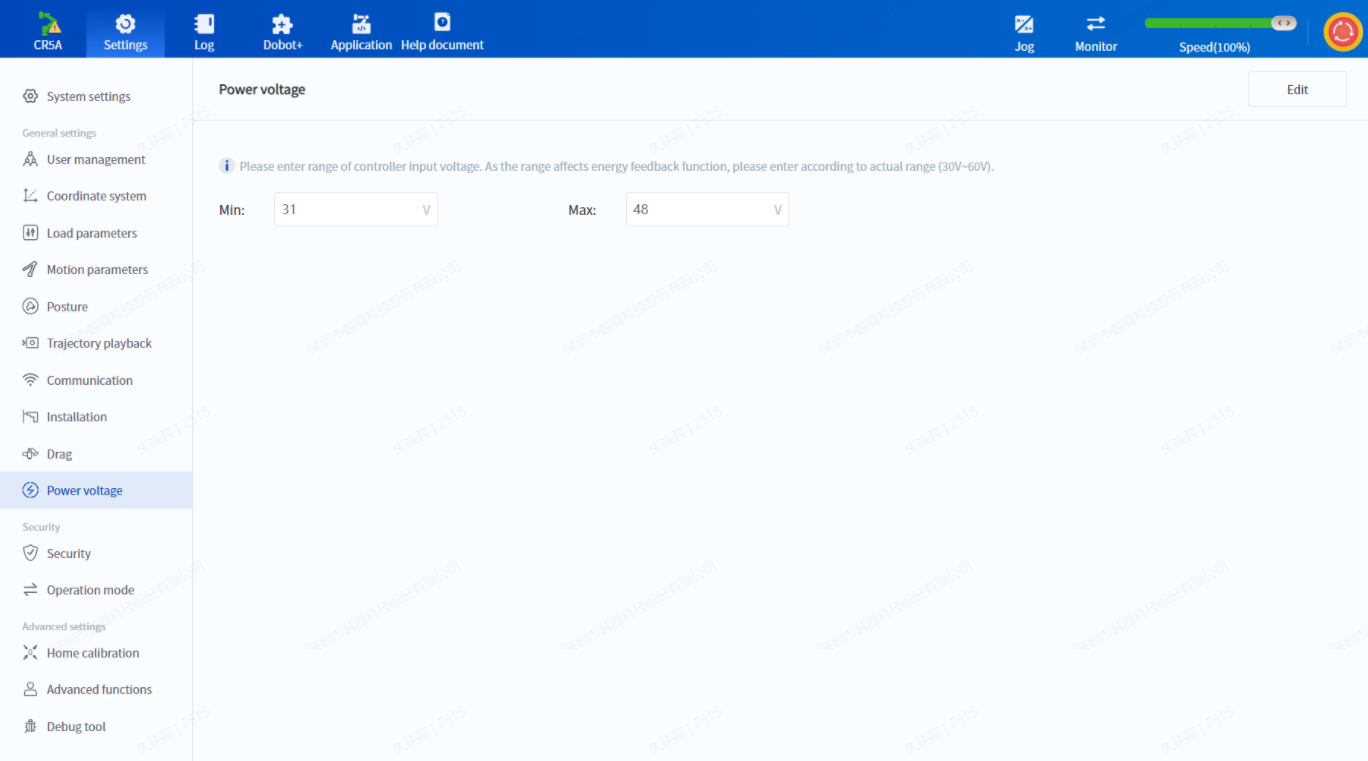
- Added a voltage setting interface for CC262 DC input controller.
Set the voltage range of the external power supply when connecting the CC262 DC input controller to determine the robot’s power voltage. The setting interface is as follows:
- DobotStudio Pro now has Traditional Chinese as the display language, which can be switched in System settings.
- Synchronized the Chinese log optimization from version 4.5.0 to the English logs. For languages other than Chinese and English, the logs will be displayed in English.
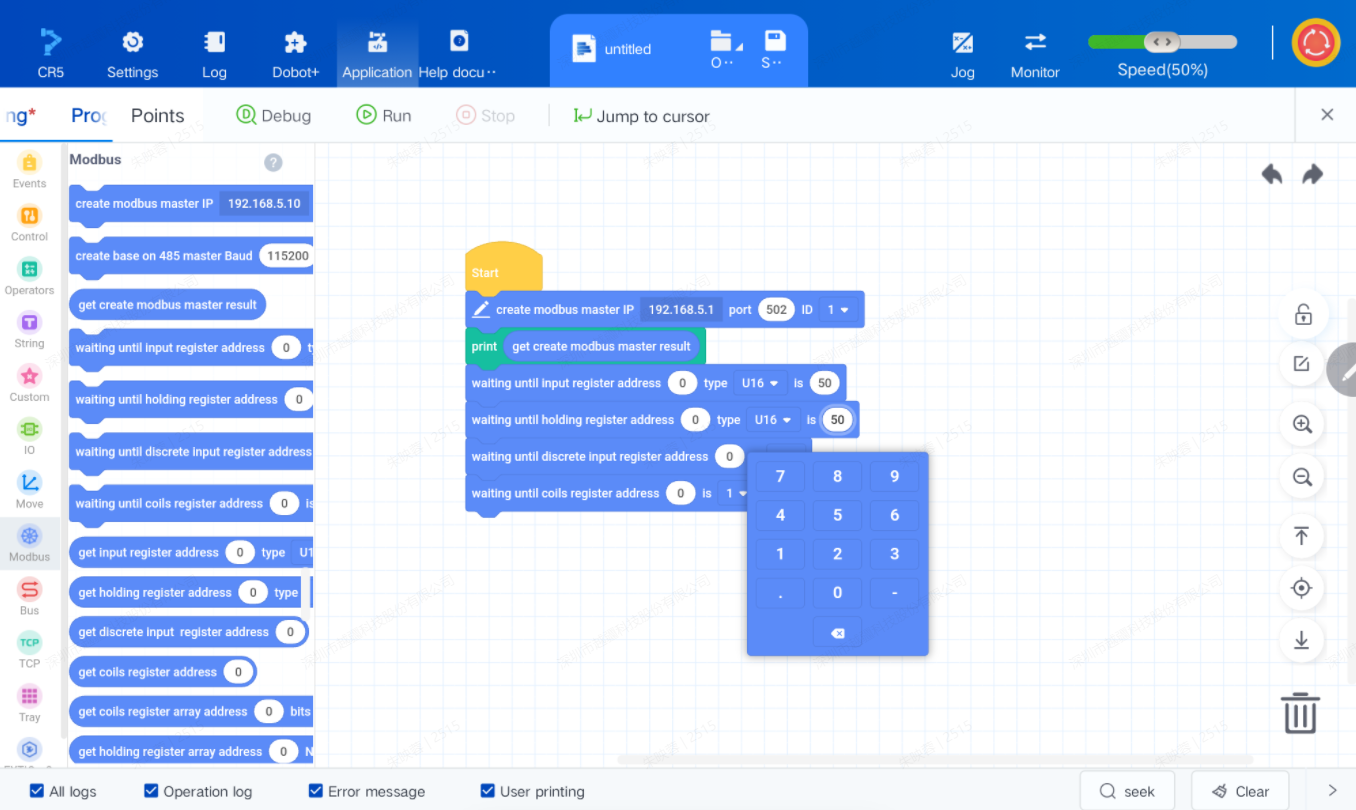
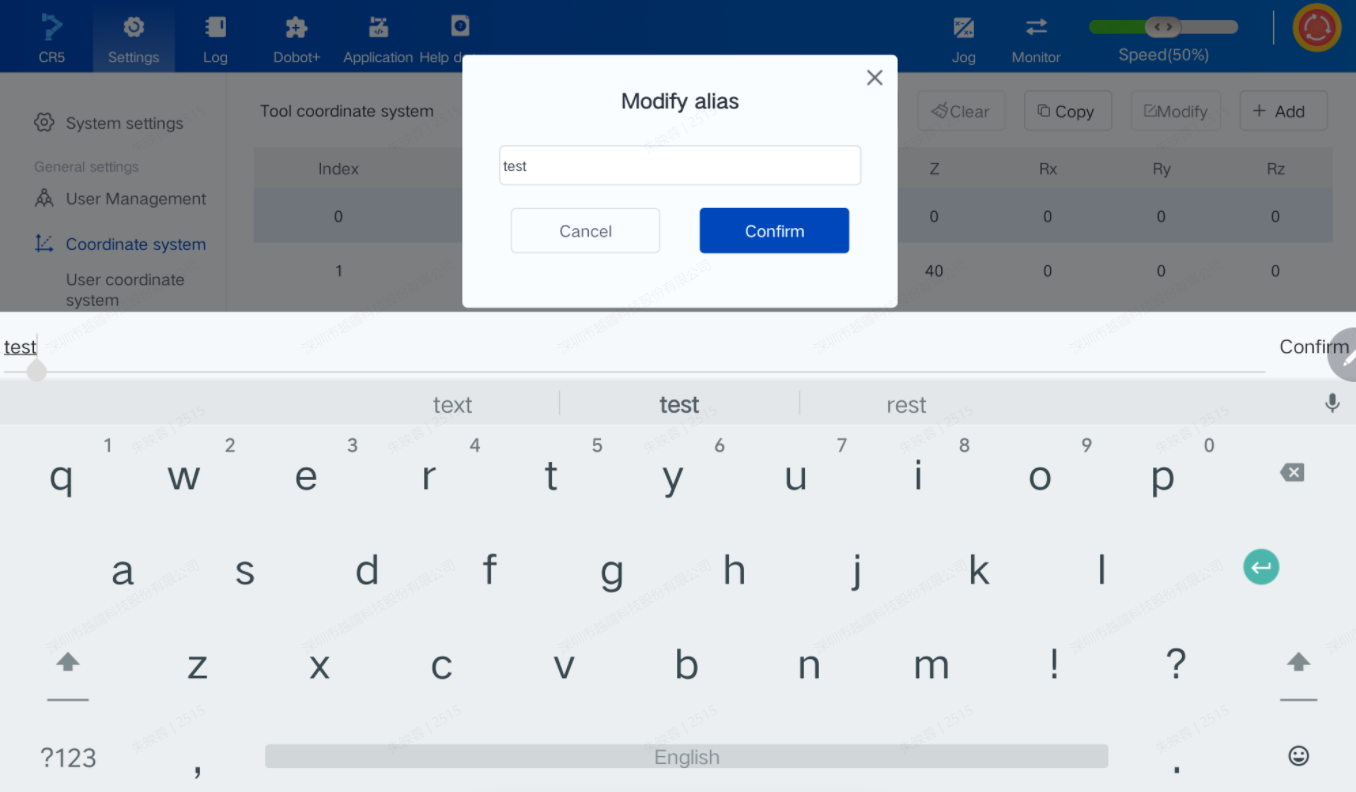
- Optimized the soft keyboard interaction on mobile devices.
- When the input box only allows numeric input, the numeric keyboard is displayed.
-
- Added a display of input content above the system keyboard so users can confirm input content even when the keyboard covers the input box.
- Optimized the SafeSkin detection logic to reduce false triggers.
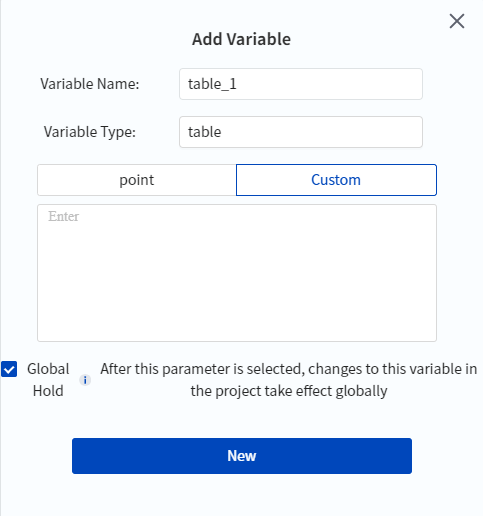
- Added a custom variable type “table” for global variables, expanding the application range of global variables.
- Added compatibility checks between Dobot+ plugin version and controller version to avoid issues caused by version incompatibility.
- Added filtering and searching functions to the project logs to quickly filter valid information and locate problems.
- Added parameters to the coordinate system commands SetUser and SetTool to support setting the effective range, and the corresponding blocks are merged from two into one. This change is backward compatible and will not affect existing projects.



- Optimized the dragging method for blocks, allowing them to be dragged by holding any area for a certain period, rather than just the left 30% area.
- If no connectable devices are found after a period of time when DobotStudio Pro is opened, a prompt will appear with a link to the help document to assist users in resolving connection problems.
- Optimized the data sending logic for the terminal interface to resolve occasional abnormal data issues.
- Optimized the storage mechanism for global variables to prevent occasional loss of global variables.
V. Bug Fixes
Fixed the following issues:
- Display anomalies in DobotStudio Pro at lower resolutions.
- The lack of fold/unfold all functions in the subroutine for blockly programming.
- Occasional crashes when running welding scripts on App.
- Overwriting existing projects when saving by quickly tapping on App.
- 3D page crashes after long-term operation on App.
- The controller sometimes crashed without an alarm and lost zero points upon restart.
- Running scripts at 100% global speed towards the reduction side triggered the speed-limit alarm of virtual wall when reduced mode is ON.
- No save prompt when running scripts after deleting the subthread.
- Quickly switching direction while continuously jogging may cause the device to stop moving.
- Error in converting the calc user/tool coordinate system block to code.
- Display anomalies in the jog panel after being windowed.
- Repeated authentication issues with the virtual controller.
- Incorrect coordinates delivered when calibrating the original point with Runto in the coordinate system.
- Options in advanced settings not auto-resetting when clicking Cancel.
- Incorrect registration code and project-import path in the Teach Pendant Dobot+.
- When the StartPath command is called, using the Pause and Continue commands results in an error.
- Algorithm crashes when resuming after triggering collisions in an empty script loop.

 Metal Processing
 Automotive
 Food & Beverage
 Chemical
 Consumer Electronics
 Healthcare
 New Retail
 Semiconductor
 Welding
 Palletizing
 Loading and Unloading
 Assembly
 Bin Picking
.svg) Gluing
Gluing
 Insertion
 Polishing